How to Identify a Coin by Picture (Step by Step)
Photograph both sides sharply in soft side light, run the photos through a coin identifier app or Google Lens, then confirm date, country and mint mark in a catalog such as Numista or PCGS CoinFacts. Details matter: a 1943 cent struck in bronze instead of steel sold for $298,125 (PCGS AU50 CAC, GreatCollections, November 2022).
Have one in hand? Scan it with CoinLens to identify it and see an estimate in seconds.
| Setting | Do this | Why | Common mistake |
|---|---|---|---|
| Background | Plain gray card, dark cloth or white paper | The coin’s edge stands out cleanly | Patterned tablecloth or your palm |
| Light | Daylight near a window, or two lamps at about 45° from opposite sides | Even light shows design without glare | Overhead room light making a hot spot |
| Flash | Off | Flash flattens relief and glares on shiny coins | Leaving auto-flash on |
| Angle | Phone parallel to the coin, straight above it | Keeps the coin round and lettering readable | Tilted shot turns the coin into an oval |
| Distance | Coin fills most of the frame; use 2× zoom instead of moving very close | Very close phone lenses distort and blur | Tiny coin in a big frame |
| Focus | Tap the coin to focus; hold still or brace your elbows | Dates and mint marks are small | Motion blur |
| Sides | One photo of each side, same setup | The back often carries the denomination or mint mark | Only photographing the ‘heads’ side |
| Worn coins | Add one low raking light from the side | Shadows bring out faint lettering | Rubbing the coin to ‘clean’ it |
Which one is yours? Check it with CoinLens →
Practical photography guidance; no special equipment needed. Never clean a coin before photographing it: cleaning leaves hairlines that collectors and graders penalize.
DEMO
Check your How to Identify a Coin by Picture (Step by Step)
Add a photo of each side
Add a photo of at least one side first.
Demo — photos stay on your device. Nothing is uploaded.
DEMO
Your photos are ready. The identification happens in the CoinLens app.
On the web this is a demo — it can't recognize coins. In the app, the same two photos give you the coin's name, details and a value estimate.
Scan these in the free appEXAMPLE — what CoinLens shows
Value estimate:
Sample from our guide's data, not a result for your photo.
That was a sample. Scan your coin →·
| Method | Cost | Best for | Limits |
|---|---|---|---|
| Coin identifier app (e.g. CoinLens) | Free download, limited free scans | Fast ID from two photos, value estimate, saving a collection | Estimates only; free scans are limited |
| Google Lens | Free | A first guess at the coin type | General image search; often misses date and mint mark |
| Numista | Free (account for some features) | World coins: exact catalog entry and mintage | You still compare by eye |
| PCGS CoinFacts | Free basic access | US coins: varieties, photos, auction records | US-focused |
| A coin dealer or club | Usually free to look | Hand inspection, worn or odd pieces | Needs the coin in person; dealers may also want to buy |
Which one is yours? Check it with CoinLens →
Pricing models as listed by each service; see the sources. We make CoinLens, so treat our description of it as a fact sheet.
| Question | From a good photo | Needs more than a photo |
|---|---|---|
| What coin is it (country, type, denomination)? | Yes, usually | Badly worn or unusual pieces may need a specialist |
| What year and mint? | Yes, if the date and mint mark are sharp in the photo | Very worn dates; tiny mint marks on small coins |
| What is it made of? | Usually, from the type and date (e.g. US dimes 1964 and earlier are silver) | Off-metal errors: weigh the coin or test with a magnet |
| What’s a typical value? | An estimate for the type, year and mint | Exact price depends on grade |
| What grade is it? | Rough idea only | Professional grading (PCGS, NGC, ANACS) |
| Is it a rare variety or error? | Sometimes visible | Magnification and attribution guides; certification |
| Is it genuine? | No | Weight, measurements and authentication by a grading service |
Which one is yours? Check it with CoinLens →
A photo identifies the coin; it can't weigh it, measure it or authenticate it. That's why valuable coins still go to a grading service.
| Problem | Likely cause | Try this |
|---|---|---|
| Wrong coin suggested | Glare or a tilted photo | Turn off flash, shoot straight down, retake both sides |
| Right type, wrong year | Date too small or worn | Read the date yourself with a loupe and search the catalog by year |
| No match at all | It may be a token or medal, not a coin | Check for a country and denomination; see our tokens guide |
| Foreign coin not recognized | Unfamiliar script or calendar | Use our foreign coin identifier tables to read the legend and date |
| Value looks too high | The estimate is for a rare variety or top grade | Check the specific variety’s diagnostics before believing it |
Troubleshooting guidance; see the linked guides for scripts, tokens and varieties.
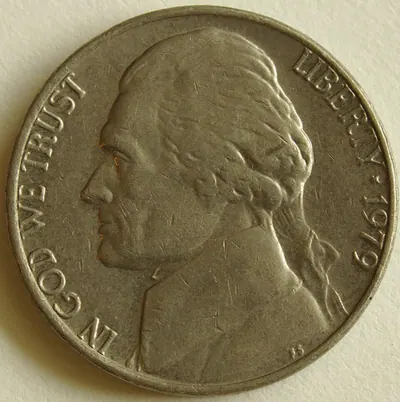
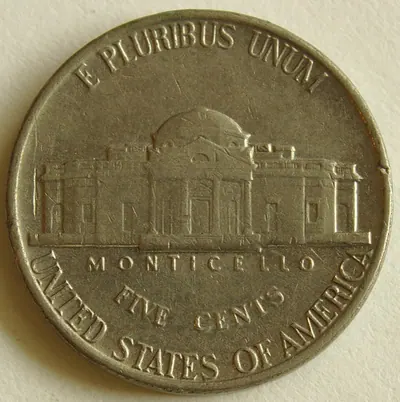
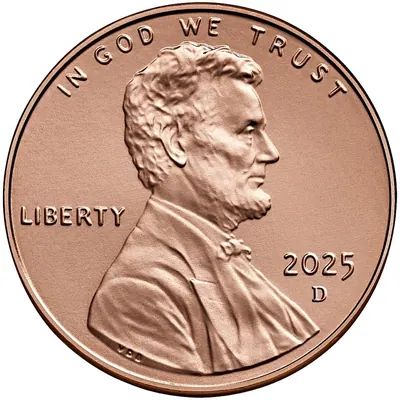
- Photograph both sides. Make them sharp and flat, with no flash and a plain background (the first table above).
- Read the four key facts yourself: country, denomination, date and mint mark.
- Run the photos through an identifier: a coin app, Google Lens or Numista.
- Confirm the exact match in a catalog: Numista for world coins, PCGS CoinFacts for US coins.
- Check for varieties and value if the coin is a known key date, error year or silver.
Want to see what a scan looks like first? Our coin scanner demo walks through it with your own photos, which stay on your device.
Step 1: Take a photo that can be identified
Most failed identifications come from bad photos, not hard coins. The setup in the first table above works with any phone:
- Plain background. A gray card is ideal; dark cloth or white paper works. Avoid patterns and your hand.
- Soft, even light. Daylight near a window, or two desk lamps at about 45° from opposite sides. For a worn coin, add one low lamp from the side: the raking light throws shadows across faint lettering and makes it readable.
- No flash. It flattens the relief and creates glare, especially on silver and proof coins.
- Straight down. Hold the phone parallel to the coin so it photographs as a circle, not an oval. Fill most of the frame. On most phones 2× zoom from a few inches away is sharper than pushing the lens right up to the coin.
- Tap to focus on the date, and brace your elbows on the table.
- One photo of each side, with the same setup. The reverse often carries the denomination, and on many older coins the mint mark.
Don’t clean the coin first. Cleaning leaves hairline scratches, and NGC says improper cleaning is one of the most common reasons a coin gets a “details” grade instead of a numeric one. Photograph it as it is.
Step 2: Read the key details yourself
Even with an app, check these four facts yourself. They decide what the coin is and what it’s worth:
- Country. Look for UNITED STATES OF AMERICA, CANADA, a monarch’s Latin titles (British and Commonwealth coins), or a local name such as HELVETIA (Switzerland). If the script isn’t Latin, our foreign coin identifier has tables for Cyrillic, Greek, Arabic, Japanese and other scripts and calendars.
- Denomination. Usually a number or word on the reverse: ONE CENT, QUARTER DOLLAR, 10 KOPEKS.
- Date. Usually on the obverse. Some countries use other numerals or calendars, such as Islamic Hijri years or Japanese era years.
- Mint mark. On US coins, a small letter such as P, D, S, W, CC or O. Its location depends on the series and year. On coins from 1968 on it’s usually on the front near the date. See where the mint mark is for every US coin.
Step 3: Use an identifier
The second table above compares the options. In practice:
- A coin identifier app is the fastest route from two photos to a named coin and an estimate. Most are free to download with limited free scans.
- Google Lens is a good first guess at the type. It searches the web for similar images, so it often gets the design right but the year or mint wrong.
- Numista is the best free catalog for world coins. Search by country and denomination, then compare designs and years.
- PCGS CoinFacts covers US coins in depth, including varieties and auction records.
If one method fails, try another: a photo Google Lens can’t place may be obvious to a coin catalog, and vice versa.
Step 4: Confirm the exact match
An identifier gives you a candidate. Confirm it by matching four things to the catalog entry: design, date range, metal and size. Then check whether the catalog lists more than one variety for your year, such as a doubled die, large versus small date, or different metals. If it does, compare the diagnostic described there with a magnifier.
This step matters because of coins like the one in the lead. A 1943 cent is normally steel. One struck by mistake on a bronze planchet sold for $298,125. A photo alone can’t tell bronze from copper-plated steel; a magnet can. Steel sticks, bronze doesn’t. When a coin could be a valuable variety, combine the photo ID with a physical test: weight, magnet or edge.
Step 5: Decide whether it’s worth more than face value
Once you know exactly what you have, look for the things that make coins valuable:
- Silver: US dimes, quarters and halves dated 1964 or earlier (90%), 1965–1970 Kennedy halves (40%), 1942–1945 war nickels (35%).
- Key dates: low-mintage years and mints.
- Known varieties and errors for that date.
- Condition: uncirculated coins are worth much more than worn ones.
The third table above sums up what a photo can settle and what needs a scale, a loupe or a grading service. For a free first estimate by type and year, try our coin value checker.
How to identify your coin with CoinLens
Coin Identifier – CoinLens (iPhone and Android) is built for this job. Photograph the obverse and reverse, and the AI identifies the coin within seconds from a database of almost 500,000 coins worldwide. It shows an instant value estimate, plus the coin’s origin, composition, minting years and history, and you can save it to a collection that totals its value. You can also search the database directly by name. Free scans are limited; Premium unlocks unlimited scans. The value is an estimate: confirm valuable coins with a grading service. See how it compares with other apps in our best coin identifier app fact sheet.
Where to sell once you know what it is
Common coins are worth face value or melt. Collectible coins sell through local coin shops, coin shows, eBay (check sold listings for your exact coin) or, for valuable pieces, auction houses after grading. Whatever you do, keep the photos: a clear pair of photos is also what buyers and dealers will ask for.
Frequently asked questions
Can Google identify a coin from a picture?
Google Lens often finds the coin type by matching your photo to similar images on the web. It’s free and good for a first guess, but it doesn’t reliably read the date or mint mark, so confirm the exact year and variety in a catalog such as Numista or PCGS CoinFacts.
What is the best way to photograph a coin for identification?
Put the coin on a plain gray or dark background, use soft daylight or two lamps from the sides, hold the phone parallel to the coin, fill the frame and tap to focus. Take one photo of each side. Don’t use flash; it hides detail and creates glare.
How do I identify a foreign coin with no English writing?
Look for the denomination number, the date (which may use another calendar or numerals), and the coat of arms or ruler’s portrait. Upload both sides to an identifier, then confirm in Numista by country and denomination. Our foreign coin identifier lists the inscriptions people most often can’t read.
Can an app tell me what my coin is worth?
Apps give an estimate for the coin’s type and year. The actual price depends on condition (grade), mint mark and any varieties. Use the estimate to decide what’s worth a closer look, and get coins worth more than about $100 professionally graded.
Is there a free app to identify coins by picture?
Most coin identifier apps, including CoinLens, are free to download with a limited number of free scans and a paid plan for unlimited use. Google Lens is free but is a general image search, not a coin catalog.
Can a photo tell if my coin is real or fake?
No. Photos can’t measure weight or diameter or examine the surface the way an authenticator does. If a coin might be valuable, weigh it against the official specification and have it authenticated by PCGS, NGC or ANACS.
Do I need to photograph both sides of the coin?
Yes. Many coins carry the date on one side and the denomination or mint mark on the other, and identifiers match more reliably with both. Use the same lighting and angle for each side.
Sources
- Error 1943 copper penny sells for nearly $300,000: PCGS AU50 CAC, GreatCollections, Nov 13 2022 (CoinNews)
- Where to look: Numista world coin catalog
- Where to look: PCGS CoinFacts
- Google Lens
- US Mint: mint marks
- Coin Identifier - CoinLens — App Store listing
- CoinLens — Google Play listing
- NGC: Details grading (cleaned coins)
Values are estimates, not offers. Condition decides the price; for a valuable coin, get a professional grade.